



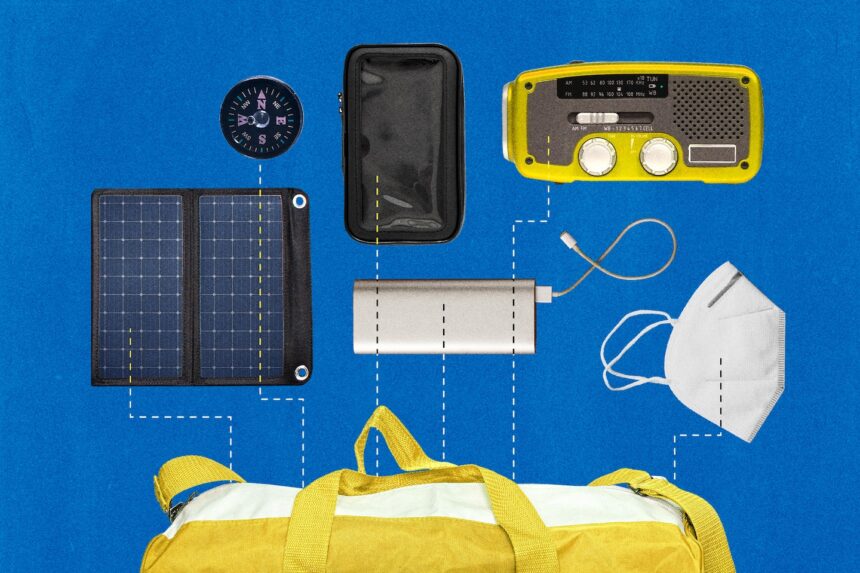
Emergency planning often means making sure you can survive without technology. Electricity and cellular service can be down for hours or days after a major disaster. However, you can and should plan for some tech-based backup plans, whether it’s keeping your phone working long enough to reconnect with your family or having a way to receive emergency updates.
This is our tech survival list and is in addition to the basics recommended by the Federal Emergency Management Agency. Not everyone has the budget to fill their bag with new technology, so do what you can and check in with your local agencies to see whether they offer free supplies.
Plan for the right disasters
First, know your worst- and medium-case scenarios so you can plan for the disasters most likely to happen where you live. While some are obvious — hurricanes happen in Florida — there are many other situations you should consider, according to DeeDee Bennett Gayle, an associate professor in emergency management at the University of Albany.
For example, the East Coast of the United States recently battled wildfire smoke, an issue more familiar to residents of California, Oregon and Washington. Last year, Chicago sheltered from tornadoes and Vermont was pummeled by flooding.
Start by looking up your state emergency management site. Many states have tools that let you look up your address and see risks for your exact location, alongside recommendations for ways to prepare or mitigate damage.
Keep your tech dry (or cool, or warm)
The most common type of natural disaster is a flood, according to the World Health Organization. Other disasters that can hit almost anywhere include record-breaking heat waves and wet or freezing winter storms.
That makes keeping your smartphone the right temperature or moisture level a priority. The latest smartphones claim to be water resistant, but you should still try to keep them as dry as possible.
Include a handful of large Ziploc bags. You can toss your phone, cords and battery in here if you’re facing a flood or wet weather, but also use them for any important documents in case of an evacuation.
GET CAUGHT UP
Stories to keep you informed
If you’re interested in buying something more advanced, look for a large-capacity bucket dry bag that is big enough to hold a laptop and phone, or just a waterproof sleeve for a smartphone that lets you see the screen. Surf stores and outdoor stores are a great place to start. If you’re in a zone prone to high waters, look for a dry bag that is designed to float.
Smartphones can stop working as well if they’re too cold or too hot — typically outside the range of 32 degrees to 95 degrees Fahrenheit. Keeping a smartphone warm is easier. You can just make sure it’s snug in a pocket next to your body or wrapped up in fabric. Keeping it cool is trickier, but any insulated cooler bag can work if you have something in there to keep the temperature down. Follow the same rules for backup batteries, which can lose capacity if too cold or malfunction if too hot.
Avoid changing any device’s temperature too quickly or drastically. If your phone is overheated, don’t pop it in the fridge. More heat-related advice is here.
Tune in to NOAA weather radio
A radio will last far longer than a smartphone and can be a key source of emergency updates from organizations like the National Oceanic and Atmospheric Administration. Any big-box retailer will have a selection of weather-band radios, powered by a crank or replaceable batteries.
Some recommended brands include Midland and Eton, and basic models can start at $25. You can find similar radios online or in any big retail store such as Walmart or Target. As with anything you buy from an online marketplace, beware of low-end or fraudulent brands when planning for an emergency.
Backup batteries and other power options
Experts recommend planning for at least 72 hours after an emergency. Anyone who has used a modern smartphone knows its battery life usually lasts a day. There are ways to extend the battery life, but you should still plan ahead and have extra power on deck.
Everyone should have a backup battery — also called a power bank — that can be used to recharge at least one smartphone. Look for a charger that is at least 10,000 mAh, which should be enough to recharge a smartphone twice. Although most quality power banks will hold a charge for an extended period, you still want to check them and recharge the one in your emergency kit once every three to four months to be safe. Choose a known brand name like Mophie or Anker, at least for the emergency kit.
Even if the electricity is out at home, you could find a working outlet elsewhere. Put a power cord, with the brick, in your backup kit. A multi-USB or USB-C charging cable will have different ports in one spot, so you can use it to charge various gadgets.
If you’re into extra gadgets and have the budget, you can pick up a solar charger that will juice up your phone using the sun. A solar charger isn’t as dependable as a pre-charged battery because it can depend on the time of day, location and weather.
Fill your phone with essentials
If you have cellular service, you can get urgent updates from local and state emergency agencies including evacuation orders. Some notifications are opt-in, and some you may have turned off in the past. FEMA recommends starting by opting in to its basic alerts by texting the following to 43362: Text “PREPARE” for tips on being prepared, “SHELTER” and a Zip code after a disaster to find local shelter options, and “LIST” to get more options.
Next, sign up for every local emergency-alert option you can. We walk you through the basics of emergency alerts here.
If you have power but not internet access, your phone can still be a valuable resource. Download offline versions of maps for your area on Google or Apple Maps ahead of time. Get the American Red Cross’s first aid app, which will work offline. Finally, make sure you have created a plan in advance for your entire family and saved it on everyone’s devices so they know where to meet.
If something happens to your home in a disaster, recovery will go much better with some key documents. Save all of these to the cloud so they can be accessed if something happens to your phone: photos of your home (inside and out), passports and insurance documents.
Have alternatives for tech you rely on
In addition to thinking about how to keep your tech up and running, make sure you plan for what to do if it’s not. Are you a regular Apple or Samsung Pay user? When there are widespread power or cellular outages, many stores have to return to cash-based transactions, said Bennett Gayle. If you are able, put some emergency cash inside your emergency bag — as much as you can spare and think you’ll need for three days.
Parents should plan for ways to keep their children entertained that don’t involve video games or TV shows. What you put in the kit will depend on the ages of your children and should be updated as they grow, but start with the classics like paper and drawing supplies, books or puzzle magazines and a deck of cards.