



Announcing new capabilities built to help educators and students save time, create impactful content, and deepen learning experiences within Copilot for Microsoft 365. We’re also thrilled to share over 20 additional updates and show them in action at ISTELive 24 in Denver, Colorado.
Today, we’re announcing new capabilities built to help educators and students save time, create impactful content, and deepen learning experiences within Copilot for Microsoft 365. We’ll also share over a dozen updates including global expansion of Khanmigo for Teachers, Minecraft Education Lesson Crafter, Learning Accelerators and Teams for Education news, free access to Figma through our new partnership, and more value coming to Microsoft Education.
We’re thrilled to share over 20 updates and resources and show them in action next week at ISTELive 24 in Denver, Colorado, US. Join us at the show to learn more and hear about the latest from Microsoft Education at our booth and in dozens of sessions.
Enhancing Copilot for Microsoft 365 in education
We’ve loved seeing the early adoption and benefits from education institutions already using Microsoft Copilot, our no-cost AI-powered chat with data protection, and Copilot for Microsoft 365, an add-on for AI assistance integrated with the apps you use every day. We’re excited to now bring even more value to education in Copilot for Microsoft 365 with a new set of capabilities designed for relevant and powerful use by educators and students. These features will be included in Copilot for Microsoft 365 and will be in private previews over the coming months. Education institutions with any academic license are eligible to purchase Copilot for Microsoft 365, with no minimum, for their faculty, staff, and students aged 18 and older.
Educators will be able to use a guided content generation experience to easily kickstart materials like assignments, lesson plans, lecture slides, and more based on pedagogical requirements across Microsoft 365 apps such as Teams, Word, and PowerPoint. This includes the ability to align content to over five million education standards from 35 countries for both public and private institutions through EdGate.
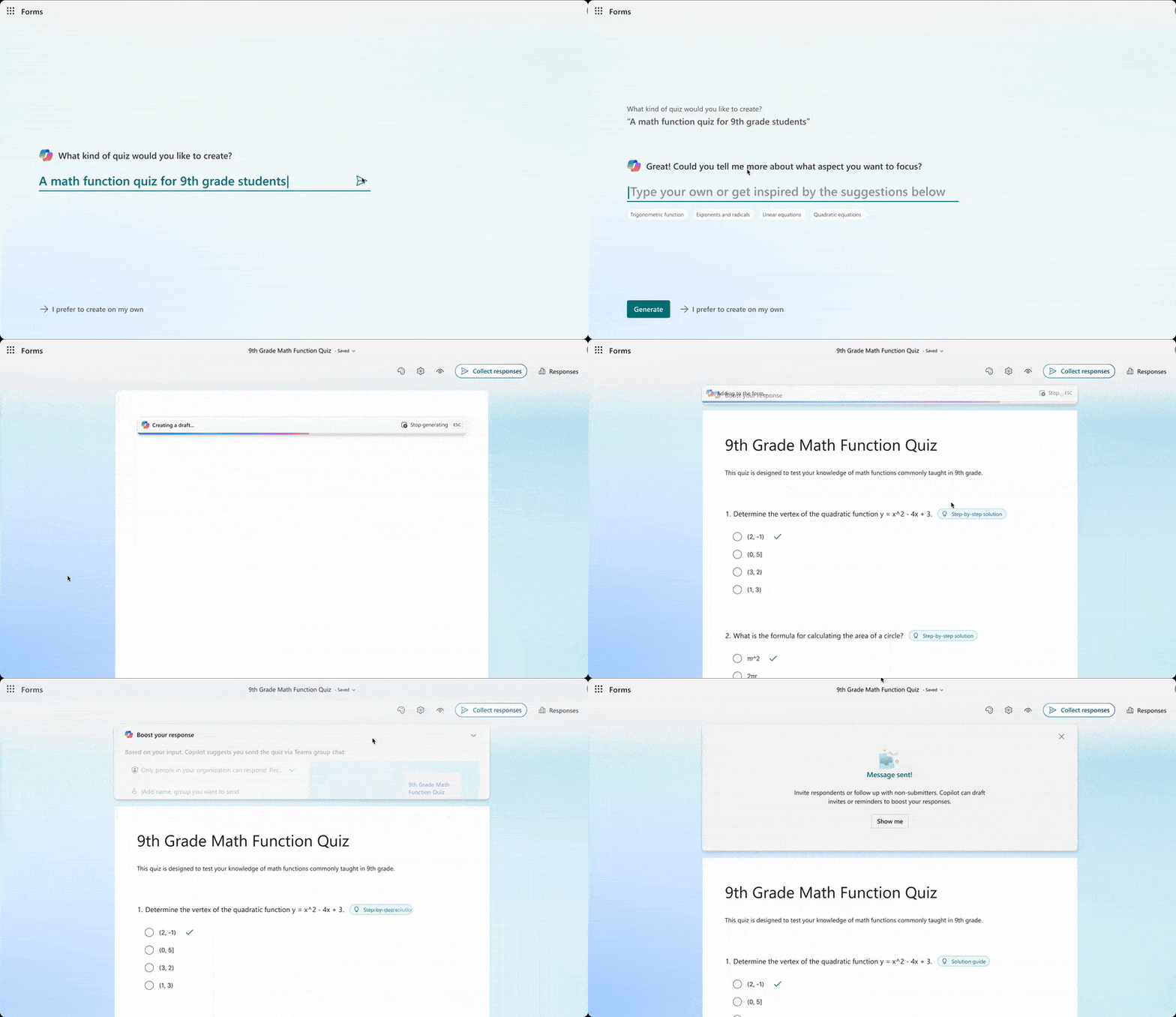
Additionally, educators now have access to quiz generation through Copilot in Forms which allows them to generate quizzes and correct answers, support students with step-by-step solutions for each question, and easily assign quizzes to classes in Teams for Education. Educators can use Copilot to generate quizzes based on their own files or pasted text. Later this year, educators will be able to align the quizzes to education standards.
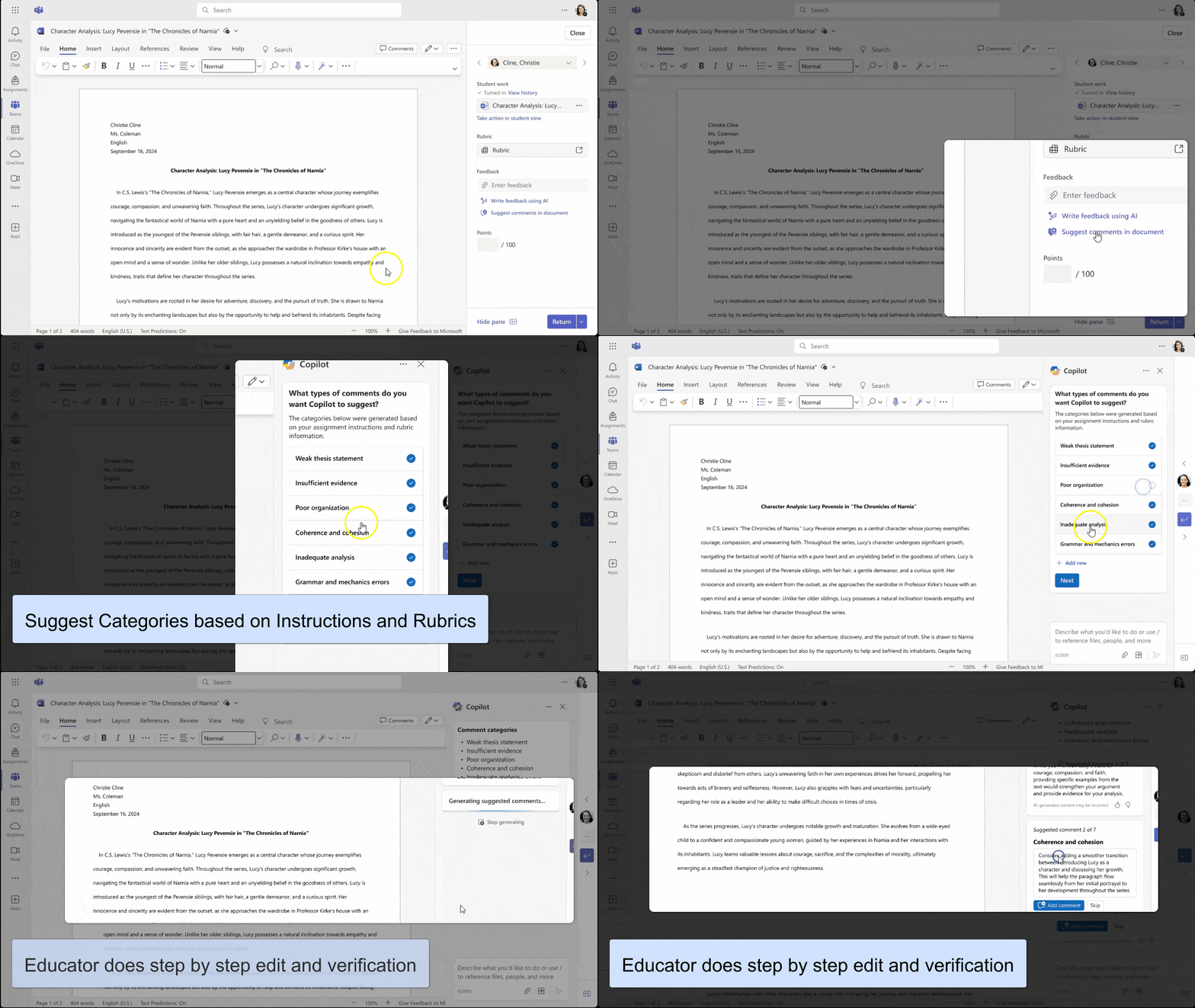
Our recent research found that students are already using AI to quickly receive initial feedback on their work. We’re excited to help educators do the same in meaningful ways with suggested AI feedback. Educators review, edit, or discard suggested student feedback, which is based on individual student progress, rubrics selections, or assignment instructions. Educators can start by selecting initial rubric scores and then add the corresponding draft feedback directly into student Word documents in the form of comments or share overall feedback in a Teams Assignment.
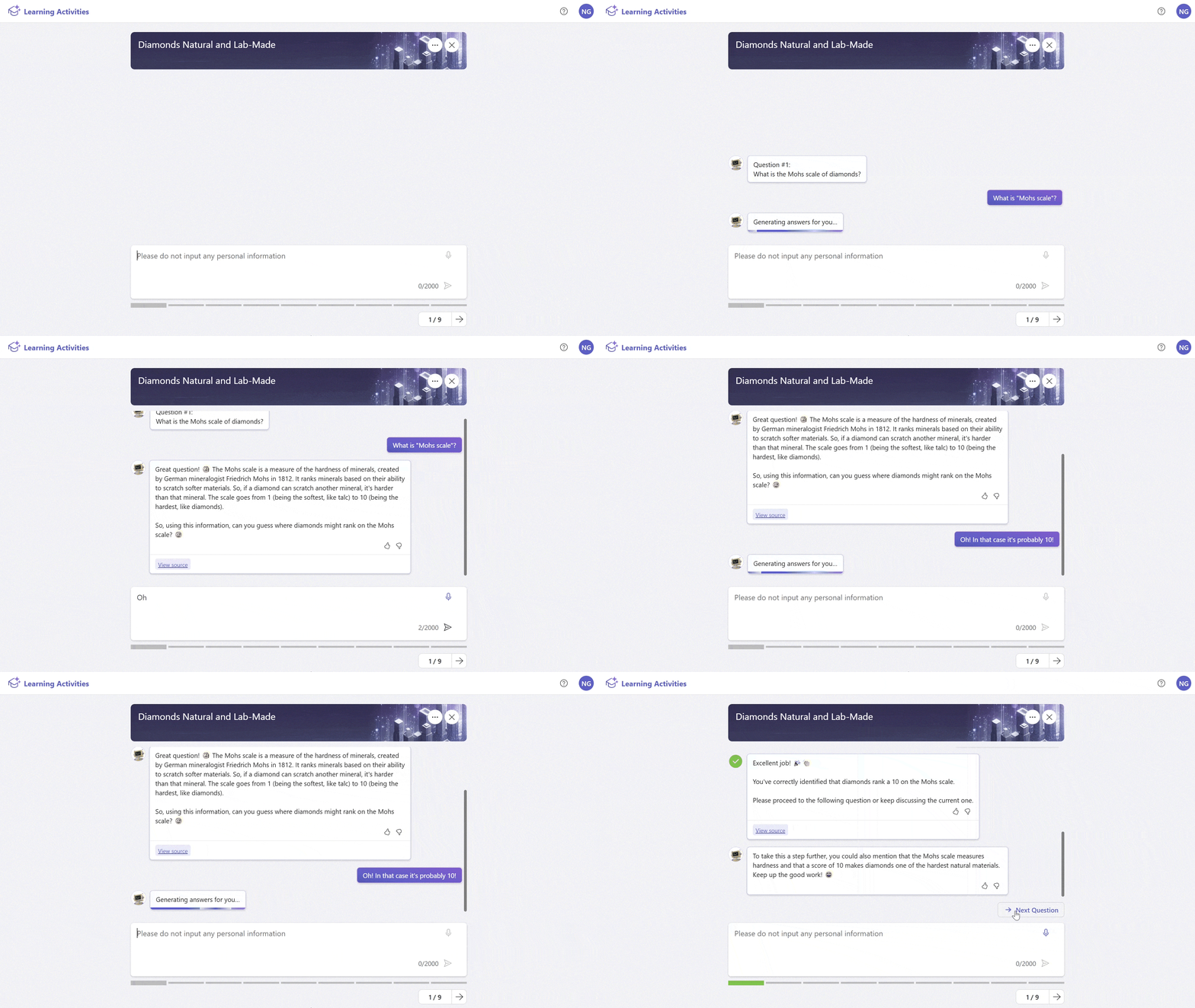
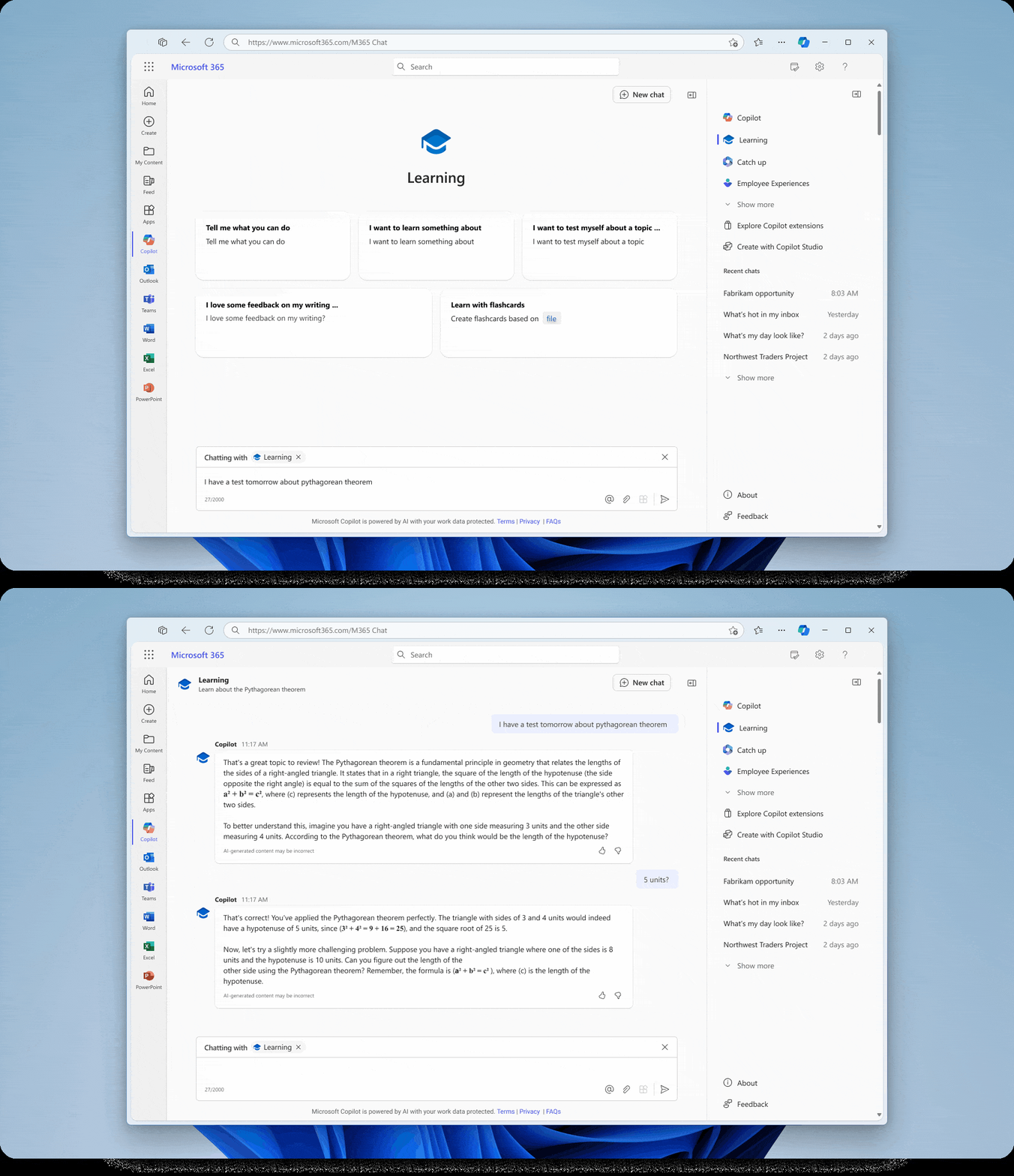
AI has the potential to further support students by accelerating and deepening their learning process in engaging ways. Interactive practice experiences will be available for educators to create and share with their students, or for students to generate on their own to help them save time and increase subject matter retention on their specific learning content. They’ll be able to use Copilot functionality across Microsoft 365 apps like OneNote to easily build study materials like flashcards and guided chat experiences based on their learning content. The guided chat experience is designed to help learners walk through and engage with the content to ask questions, get immediate feedback, and test their knowledge.
To better support educators and students with their daily tasks, we’ll be launching built-in learning and teaching extensions to help guide them through relevant activities and provide contextual, persona-based support in Copilot. They’ll see custom prompts to get started with tasks like building an interactive lecture or receiving initial feedback on their work.
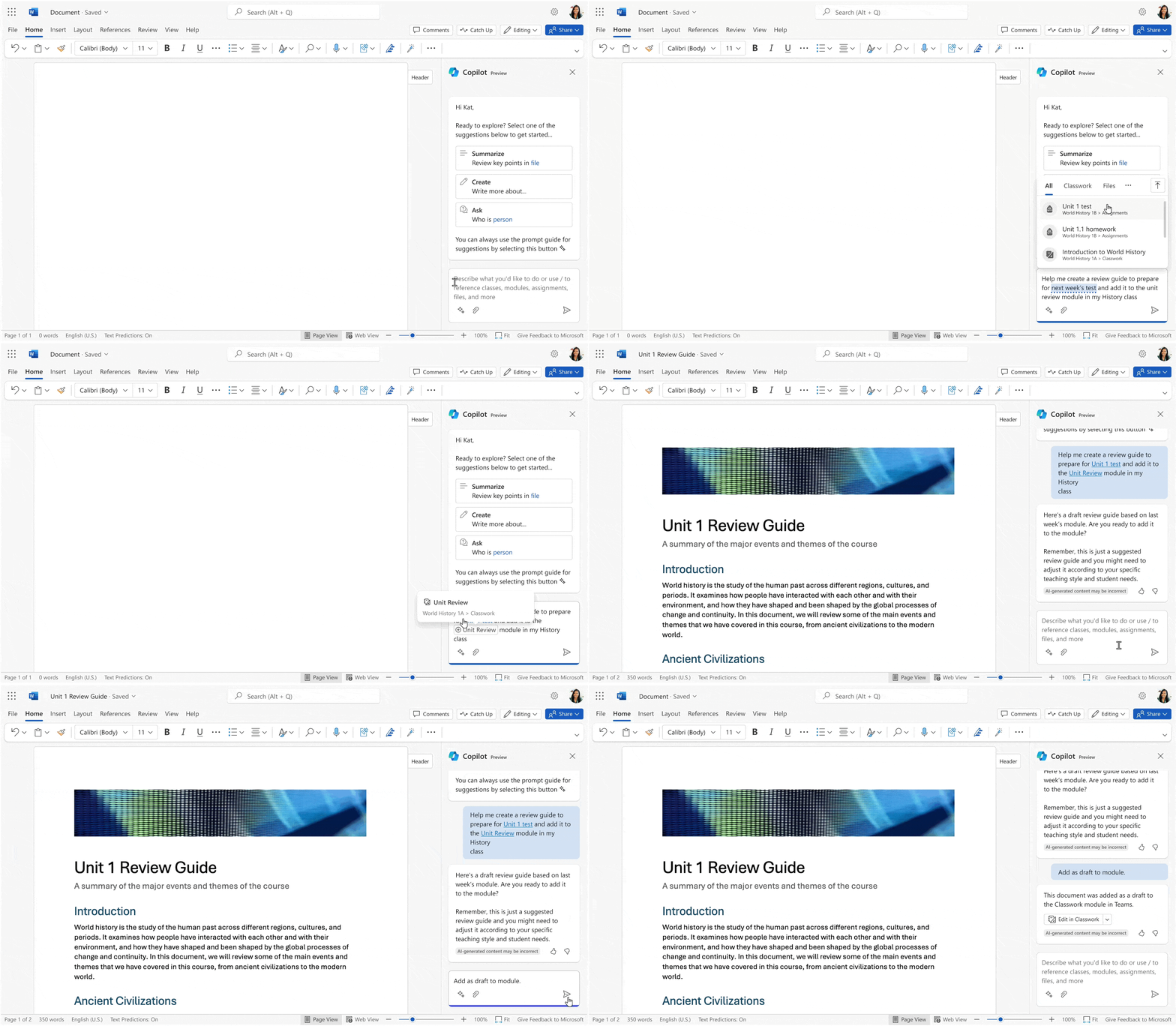
For staff, educators, and students to be able to maximize the value of Copilot for Microsoft 365, it’s essential to have access to relevant data and files. We’re introducing education data integration to generate more helpful responses, insights, and content based on personal and organizational information. This will include data from Teams for Education such as Classwork, Assignments, Grades, class rosters, and more. We’ll also interoperate data from Learning Management Systems (LMS) in the future for simpler, connected, experiences across platforms including many of these new AI-powered capabilities.
Read more about guided content generation, standards-alignment, suggested AI feedback, interactive practice experiences, learning and teaching extensions, and education data integration in the June Edition of What’s New in Microsoft EDU.
Getting started on your AI journey for free
To help get started on your AI journey, we’re excited to continue offering free tools and resources. Read about products available at no cost for educators and students like Copilot, GitHub Copilot, and more in our recent blog on our free AI offers.
Last month we announced that Khanmigo for Teachers is free for all US educators thanks to our new partnership with Khan Academy. We’ve heard from educators around the world who look forward to using Khanmigo for Teachers, and we’re excited to share that we’ll be expanding free availability globally in the coming weeks. Educators can sign up to be notified regarding availability in their country. Khanmigo for Teachers is an AI-powered teaching assistant that helps streamline class prep with no prompting required. Learn more from our Khanmigo for Teachers Quick Guide.
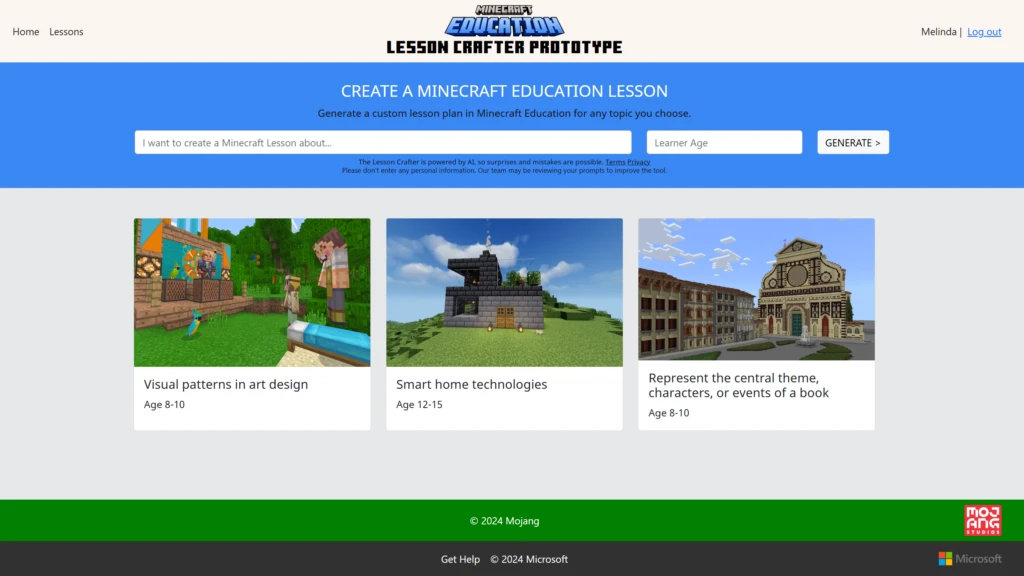
Minecraft Education will be previewing its new Lesson Crafter web tool at ISTE, which will be available for free in the coming months. Lesson Crafter allows educators to generate custom easy-to-teach lesson plans for Minecraft Education tailored to the needs of their learners on any topic and age range. Lesson Crafter will make it easier to get started teaching with Minecraft and give more teachers the opportunity to bring fun, immersive game-based learning into their classrooms.

In addition to these free tools, we believe in the importance of building a foundation of AI literacy for everyone. Get started today with the following resources:
Empowering educators and learners with Learning Accelerators, Teams for Education, and Learning Management Systems
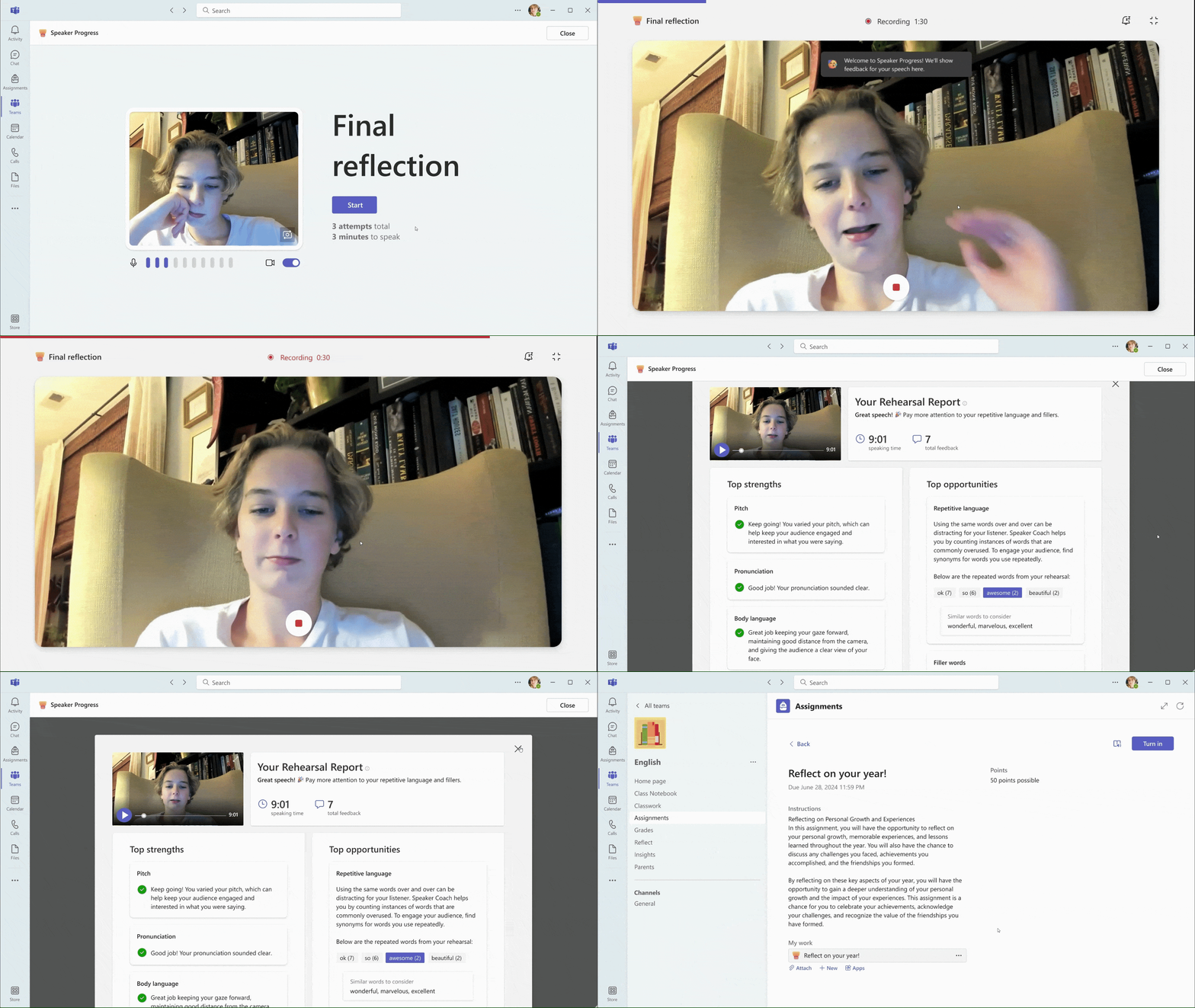
Our newest Learning Accelerator, Speaker Progress, will be generally available by July! Speaker Progress helps students build confidence in their presentation skills with real-time feedback. Educators can create presentation assignments where students will receive real-time coaching on their public speaking skills like their pace, pitch, filler words, and more. Students and educators can view a rehearsal report of top strengths and top opportunities with targeted feedback to help students improve.
Math Progress, coming to preview in July, enhances numeracy gains by streamlining the creation, review, and analysis of math practice for educators and providing feedback to students on the problems they did not solve correctly. Both Speaker Progress and Math Progress provide actionable insights to help educators collect and visualize presentation and numeracy data to track progress and improve student outcomes.
To ensure convenient access to all education institutions, we’re bringing the Learning Accelerators and Teams Assignments to your LMS through a new LTI (Learning Tools Interoperability) private preview. Educators will be able to use all the capabilities of Teams Assignments within their LMS and sync content like files and grades. Learn more from our blog about existing LMS integrations.
Partnering with Figma to help prepare students for the future
Now more than ever, skills like collaboration, creativity, and strategic planning are critical for students in an ever-changing world. That’s just one of the reasons we’re excited to announce a new partnership with Figma to provide free access to Figma and FigJam enterprise tiers for all Microsoft K-12 educators and students. Figma and FigJam are design and collaboration software used by professional designers, engineers, and makers of all kinds. They can support students in building together—in a fun, interactive space that simultaneously prepares them for future career opportunities. Figma’s education offering through Microsoft 365 schools will be available in the US, UK, and Japan today, with plans for future international expansions. Admins and school leaders can apply here to get started.
We’re thrilled to partner with Microsoft to bring Figma into more classrooms. Currently, Figma is available in over 5,000 K-12 schools through our free education plan, and teaming up with Microsoft will help even more students across the world access Figma. Today’s students are tomorrow’s product builders, designers, developers and problem solvers—and we want to equip them with the best tools to bring their ideas from imagination to reality.
Yuhki Yamashita, Chief Product Officer, Figma
Bringing more value to Microsoft Education
- Clipchamp is coming to Microsoft 365 A3 and A5 licenses at no additional cost, starting next month. In today’s digital world, communication skills are increasingly important. Clipchamp equips educators and students with the ability to convey ideas visually, fostering essential skills for success—from the classroom to future careers. Integrated with Microsoft 365, Clipchamp makes video editing easily accessible. To learn more, visit the Clipchamp webpage and Clipchamp Support.
- Preview exciting updates from Minecraft Education coming for Back to School including a new Computer Science curriculum and AP CS Principles course launching at CSTA next month, esports program playbook, credentialing with Prodigy Learning, and new product updates including cloud storage on OneDrive and an AI-powered Lesson Crafter. Visit the Minecraft Education blog for details, and sign up for free summer training to learn how to bring Minecraft into your classroom or district.
- Visual Studio Code for Education, an online computer science education platform, is now available for free to empower the next generation of developers. It helps students learn to code at their own pace, develop in-demand skills with the same platform used by professionals, and bring their ideas to life. Visit the Visual Studio Code for Education webpage for more information.
- Microsoft Defender for Endpoint – Student (MDE P2 – Students) is an affordably priced version of Microsoft Defender for Endpoint P2, tailored specifically for student devices that are covered by an A5 license. It encompasses the comprehensive range of features that Microsoft Defender for Endpoint offers. With a focus on the security of students, Microsoft ensures that student devices receive the same robust protection as faculty devices do with MDE P2. This initiative is designed to protect student devices against vulnerabilities, proactively neutralize threats, halt attacks, facilitate swift investigation and remediation, and provide access to threat intelligence. Read more in our blog on ensuring secure learning experiences with MDE P2 – Students.
In such an exciting time for technology innovation, we look forward to continuing to share our progress, new capabilities, and resources to help you make the most of them. Check out the Microsoft Education Blog for the latest news and come join us next week at ISTELive 24 to explore AI in education!